← Back to overviewEquipment / Studio & locationYour set.
Your setup.
Build a location or studio setup around your production. Equipment is hired separately from labour, with each selected item and its rate shown on your quote.
Discuss your brief ↗
01 / MOBILE CAPTURE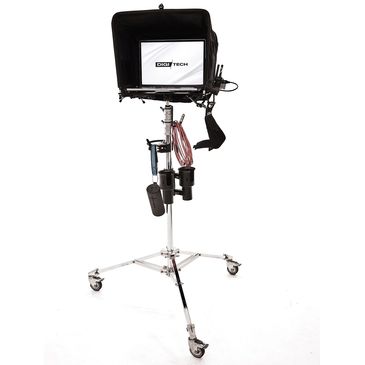
Location setup
SEPARATE HIRE ITEMSON LOCATIONLocation setup options +
- Apple MacBook Pro — M1 Max, 64GB RAM, 4TB SSD
- SWFT Brooklyn Digi Plate with Mule Hood
- Avenger Rolling Stand
- First Digi Camera Hoop
- LS Digi Battery Mount System
- 4 × Iniu 27,000mAh Laptop Power Banks
- Accsoon CineView HE Wireless Transmitter / Receiver System
- Prism 10m USB-C to USB-C Tether Cable
- Robocup Mounting System
02 / STUDIO CAPTURE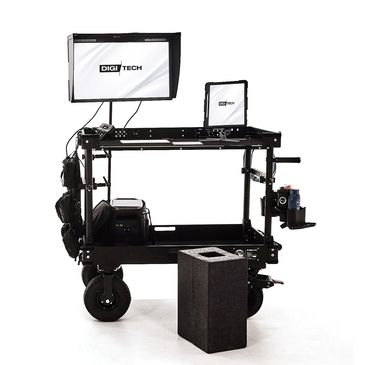
Studio setup
IN THE STUDIOStudio hire options +
- Inovativ Voyager 42 DigiCart System
- Eizo ColorEdge CG279X 27″ Colour-Accurate Reference Monitor
- Apple iPad Pro 13-inch M4 — client viewing
- EcoFlow Delta 3 Plus — 1800W portable power station
- LVNA M.A.P. Mounting System
- Area51 9.5m USB-C Professional Tether Cable
- Foambox
- Robocup Mounting System
The setups pictured show configuration options, not an all-inclusive package. Only the equipment listed on your quote is supplied. Accessories and quantities are agreed before booking.
Equipment hireNeed more for your shoot?
I have lighting, grip, cameras, viewing and power equipment available to hire. Tell me what you’re shooting and I’ll help put together the right setup.
Explore equipment & build your enquiry ↗